- Home
- Systems
- Supply chain
- e-Procurement
Every purchase requested, approved and matched in one flow
An e-procurement system puts requisition, quote, order and approval by amount into one flow, and matches the invoice with what was received. Diego analyses it and implements it with Odoo Purchase and Approvals.
35 questions · result by dimension · free
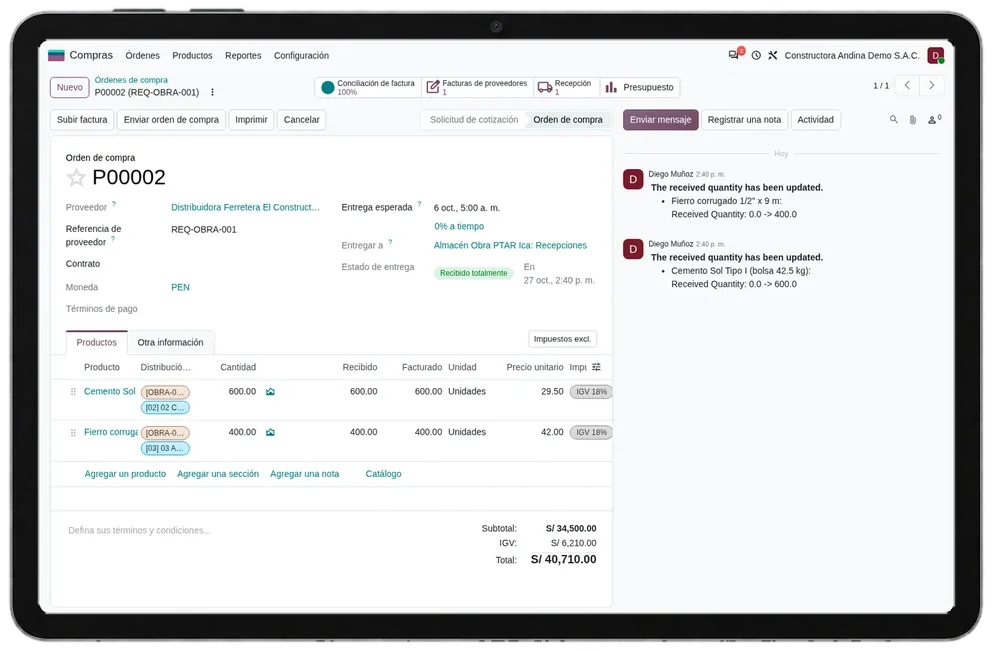
From a WhatsApp request to an approved order
Departments request in the system with a cost centre, purchasing compares quotes, the order is approved by amount and budget, and the invoice is paid only if it matches the order and the receipt.
Without that flow, requests arrive by message, the order is created after the invoice and nobody knows who approved the spend.
- 01Requisition
- 02Request for quotation
- 03Purchase order
- 04Approval by level
- 05Receipt
- 06Invoice matching
Processes it covers
Indicators that call for a e-Procurement
These signs tend to appear together when requests start outside the system and purchase orders are created to regularise an invoice.
- Requests arrive by email, WhatsApp or on paper
- There is no record of who approved a purchase
- Purchases go to one supplier without comparing quotes
- Purchase orders are created after the invoice arrives
- There are no approval levels by amount or cost centre
- A department's budget is known only once it is exceeded

Company profile for a e-Procurement, and when it is not a fit
Good fit
- Companies with several departments, sites or projects requesting purchases on their own budget
- Management teams that need to know who approved each expense and against which budget
- Companies on Odoo or considering moving their ERP to Odoo
Poor fit
- A few purchases a month approved by the owner in person: a simple purchase order is enough
- Groups on another ERP with no plan to change it: comparing purchasing platforms connected to that ERP fits better
- Public bodies under the State Procurement Law: they follow their own procedure in SEACE
Cost of purchases approved outside the system
Budgets that overrun
If available budget is not visible at approval, the overrun shows up at month end, when it can no longer be fixed.
Prices never compared
Always buying from the same supplier out of habit skips the comparison that protects margin.
Invoices that don't match
Without an order or receipt, accounting pays invoices it cannot check against what arrived.
e-Procurement analysis method
The assessment follows a purchase from the department's request to payment: quotation, order, approval by amount, receipt and matching of the invoice with the order and what was received.
Online assessment
35 questions on requests, approvals, quotations, budget and matching. The result shows at which stage purchases leave the system.
30-minute review
Diego reviews the result with you and asks for the current approval matrix and three recent purchases with their invoices. From that he proposes levels and amounts for Odoo.
Purchasing and approvals workshop
Half a day with purchasing, requesting departments and accounting: product and service catalogue, cost centres, approval levels by amount and invoice control rules.
Phased implementation
Odoo Purchase and Approvals configured department by department, in two-week cycles, with the share of purchases with a prior order measured before and after.
Dimensions of the e-Procurement assessment
Requisition and approval
Example: How does a department request a purchase?
Catalogue and cost centres
Example: Are the products and services you buy in a catalogue?
System coverage
Example: Where are supplier quotes kept?
Integration with warehouse and accounting
Example: When the goods arrive, how is the receipt recorded against the order?
Purchasing KPIs
Example: Do you measure how long a purchase takes from requisition to order?
Adoption by departments
Example: How do departments record their purchase requests today?
Budget control and segregation
Example: How is available budget controlled when a purchase is approved?
Your company's inputs to a e-Procurement project
Data
- Catalogue of purchased products and services, with unit and account
- Cost centres and budget per department
- Frequent suppliers with tax ID (RUC) and payment terms
People
- Purchasing manager
- One representative per requesting department and one from accounting
Access and documents
- Odoo or current ERP database with an administrator user for purchasing
- Current approval matrix, even if informal
Diego's services in a e-Procurement project
Approval matrix
With management we define levels by amount, cost centre and purchase type, and who stands in for each approver.
Deliverable: signed approval matrix
Odoo Purchase and Approvals configuration
We configure requests, requests for quotation, blanket agreements, double validation and invoice control with your suppliers and products.
Deliverable: purchasing flow tested with three real purchases
Budget and analytic accounting
We link the order to the cost centre and analytic account so the available budget shows at approval and the expense is booked on receipt.
Deliverable: budget per department visible at approval
Training by department and go-live
We train requesters, approvers and buyers, and measure how many purchases go through a prior order in the first weeks.
Deliverable: manual per role and baseline of purchases with a prior order
Platforms we compare for a e-Procurement
Odoo
Odoo Purchase (requests for quotation, blanket orders, double validation) and Approvals. It is the platform Diego implements with.
Other recognised platforms
- SAP Ariba
- Coupa
- Jaggaer
- Oracle Procurement Cloud
- Ivalua
Comparison criteria
- Department requests with cost centre and available budget in view
- Approval by amount and cost centre, with two or three levels and a record of who approved
- Requests for quotation to several suppliers and blanket agreements with current prices
- Invoice control against order and receipt before payment
The order of the list implies no preference. The choice of a procurement platform comes from your approval flows and your spend categories.
Systems a e-Procurement exchanges data with
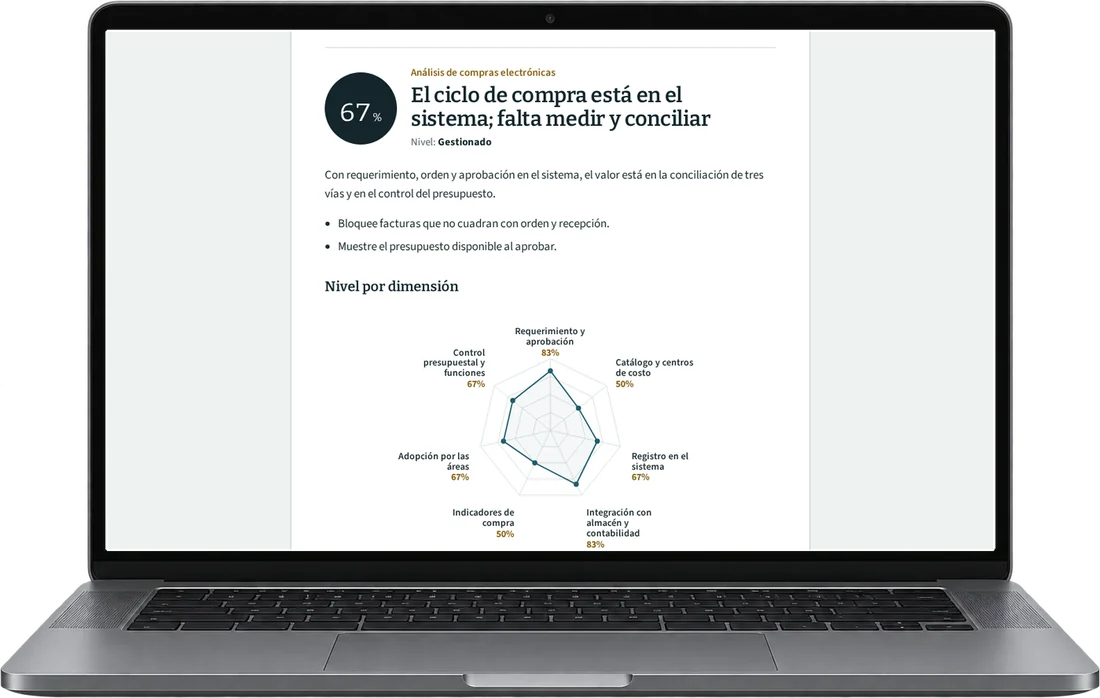
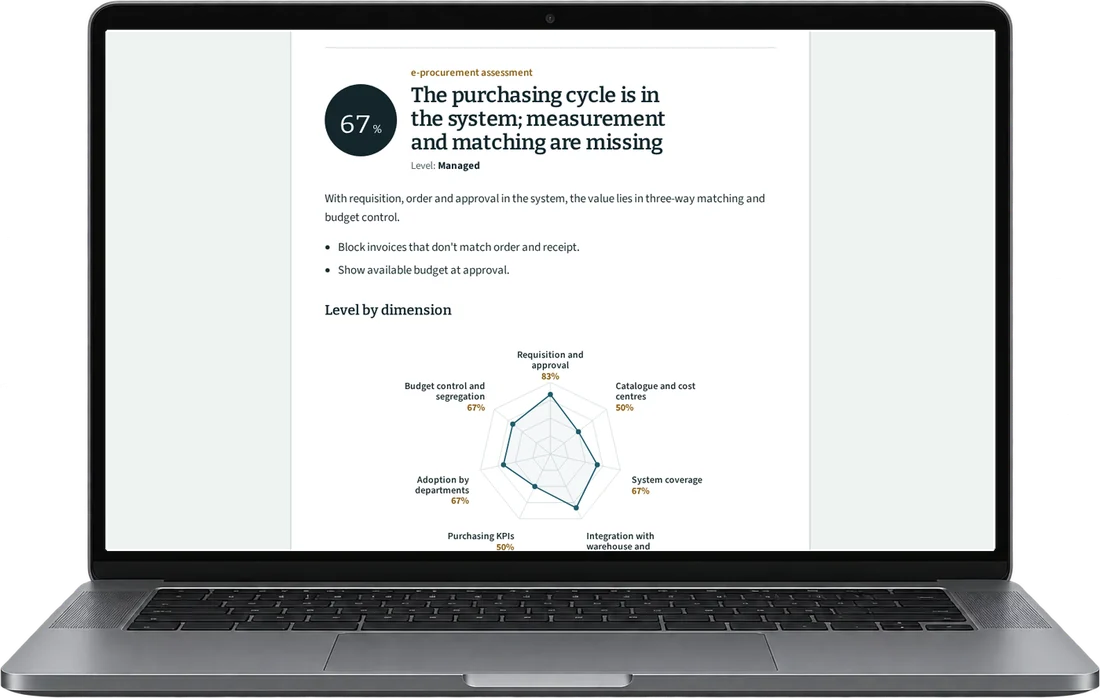
e-Procurement assessment result in 35 questions
This assessment measures how your company requests, approves, receives and pays for operating purchases: fleet, warehouse, services and branches. The questions describe where each step is recorded, from a WhatsApp message to an approved ERP order.
Scored dimensions
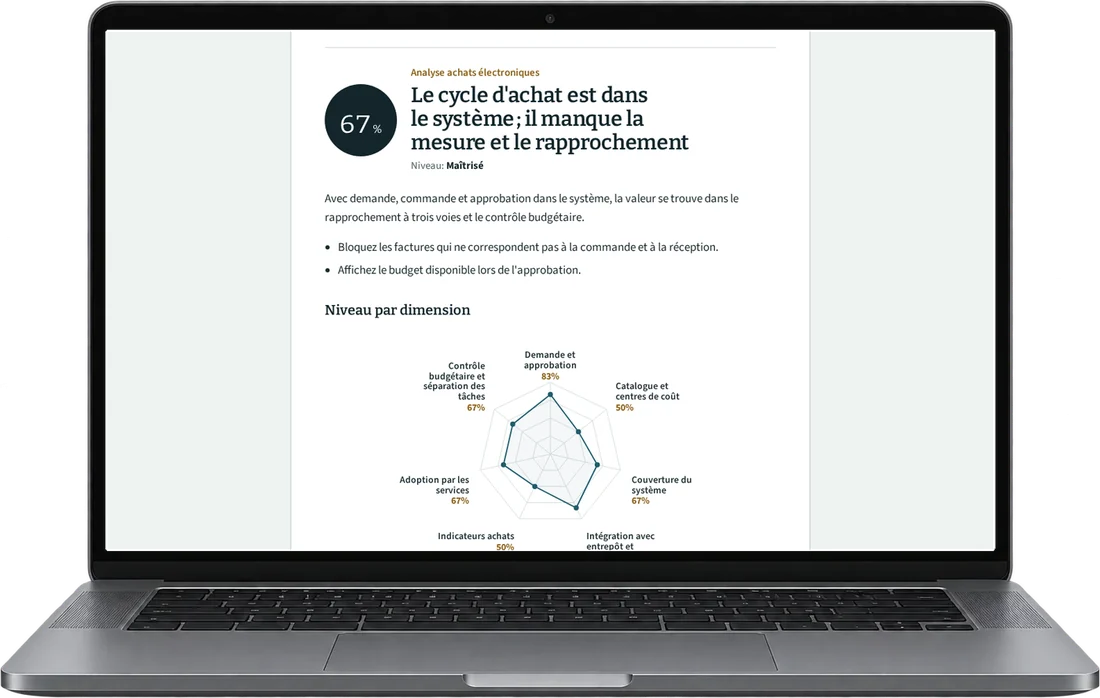
- Requisition and quotation. It observes whether each area requests purchases through a common channel, with product and required date, and whether purchasing compares quotes before choosing a supplier.
- Approval levels by amount. It observes who approves each order by amount and cost center, whether that matches the written matrix and whether exceptions are recorded.
- Catalog, agreements and cost center. It observes whether purchased items have a code, unit and usual supplier, whether repeat supplies have a price agreement and whether each purchase carries its cost center.
- Order, receipt and invoice. It observes whether what arrives is recorded against the order line and whether the invoice is matched with order and receipt, or with the transport service acceptance.
- Spend commitment and budget. It observes whether spend is committed with an approved order before buying, whether the approver sees the available budget and whether the purchasing cycle is measured.
What you receive
When you finish you receive your level in five purchasing cycle dimensions and the gap in each. Each gap includes the first action you can configure in Odoo Purchase and Approvals or in your ERP.
18 scored questions and 12 context questions (type of operation, size, current system). Context questions are not scored: they let us read the result against similar operations.
Common questions about a e-Procurement project
They are configured by amount and cost centre, with two or three levels at most. More levels tend to push approvals outside the system.
Each site or branch requests with its own cost centre and budget, and approvals follow its own matrix. Purchasing sees everything consolidated.
If your ERP is not Odoo and you do not want to change it, we compare its purchasing module with platforms such as SAP Ariba or Coupa and help you decide with your data.
The online e-Procurement assessment and the 30-minute review are free. If a workshop or a project makes sense afterwards, you get a proposal with scope and deliverables before deciding.
Only Diego Muñoz sees your answers on requisitions, approvals and matching of order, receipt and invoice, to prepare the review. They are not shared with third parties or used for bulk mailings.
A 30-minute e-Procurement review with Diego
Take the assessment and book the review with your approval matrix, even if it lives in an email. Diego Muñoz replies in person, on Lima time.
WhatsApp +51 919 488 260 · damunoz@dmunozgroup.com