Systems that pass data on their own, without duplicates or silent failures
I connect your ERP to online stores, marketplaces, delivery apps, banks and payment gateways, with a data contract, safe retries and an alert when something fails.
36questions on data contracts, errors and monitoring, in 8 minutes
APIs, webhooks and data flows with every transaction tracked
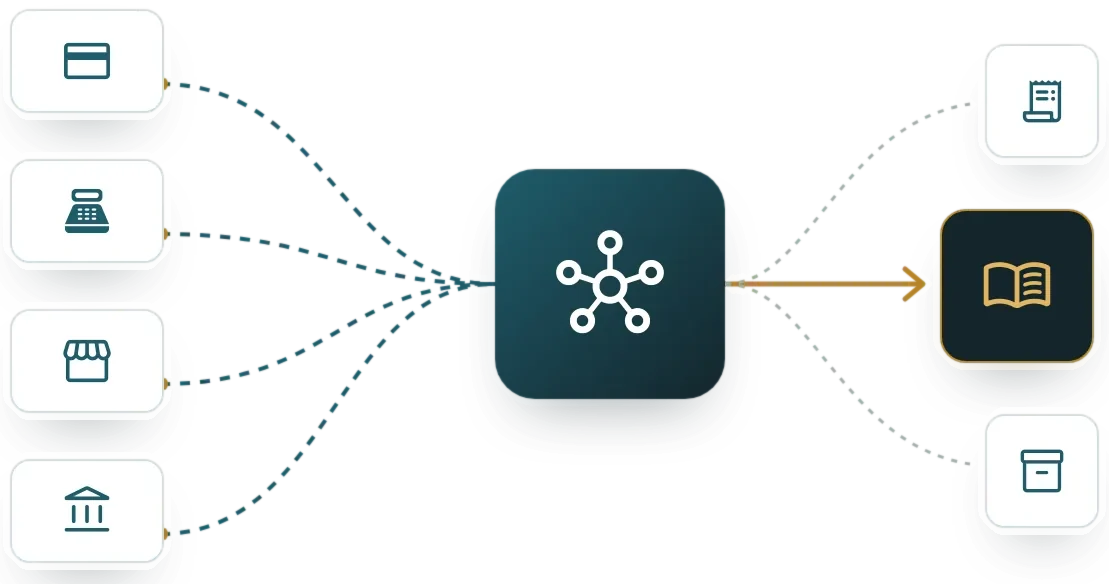
An integration moves orders, payments, inventory or customers from one system to another without anyone keying them. It uses the APIs and webhooks each system publishes, or files when there is no other way.
An integration platform (iPaaS) brings those connections into one place, with logging, retries and monitoring. With few integrations, a well-built in-house service does the same job.
Signs your company needs one
- Someone copies data from one system to another every day
- Marketplace or delivery-app orders are keyed into the ERP
- An integration fails and nobody knows until the customer complains
- Each integration was built by a different vendor, without documentation
- There is no test environment for integrations
- Webhooks arrive duplicated or out of order
Integrations: who it is for and when it does not fit
A good fit for
- Companies selling on marketplaces or delivery apps that key orders into the ERP by hand
- IT teams with point-to-point integrations nobody documented
- Finance teams reconciling bank statements or payment gateway settlements every day

Not a fit when
- Volume is low and a weekly file import covers the case
- The other system exposes no API or file and the vendor will not open it; screen automation is assessed instead
- Master data on both sides does not match and nobody will sort it out first
The cost of staying as you are

Double entry
Every order copied by hand adds minutes and opens the door to a quantity or price error.
Duplicates
An uncontrolled retry creates the same order or payment twice, and fixing it involves accounting, warehouse and customer.
Silent failures
An integration that stops sending without warning is discovered through a customer complaint, hours or days later.
How I assess integrations in four steps
Each integration starts with a written data contract and ends with an alert to the owner when a message fails.

I inventory the flows
What is copied today, between which systems, how many times a day and by whom.
I write the data contract
Fields, formats, mappings and what to do with invalid data, agreed with each department.
I build and test
In a test environment, with error, retry and duplicate cases before production.
I monitor and document
Alerts to the owner, a weekly metric and documentation so your team can maintain it.
What your company provides for the systems integration project
Documentation and test credentials
For each API or portal: manual, sandbox environment and a technical account in your company’s name.
Real message samples
Orders, payments or files from a normal day and from a day with errors.
Business rules
What happens to a duplicate order, a product without a code or a partial payment.
An owner for errors
The person who gets the alert when a message fails and decides whether to retry.
From assessment to implementation
Integration map
An inventory of flows with volume, priority and risk, and the order to tackle them.
Custom integrations
APIs and webhooks with Odoo, marketplaces, delivery apps, banks and gateways, with duplicate-safe retries.
Monitoring and support
Alerts, error queue, reprocessing and periodic review of each integration.

Diego Muñoz
I implement integrations: APIs and webhooks with Odoo and other systems, marketplaces, delivery apps, banks and payment gateways, with a data contract, duplicate-safe retries, error monitoring and documentation for your team.
I implement this type of system
Take the assessmentMarket options
Between a direct integration and an iPaaS platform, the cost per flow, who runs it and the dependence on one vendor all change.
Odoo external API
Odoo publishes an API to read and write any record, accepts webhooks and has standard connectors for several stores and gateways. It works as the integration hub when the ERP is Odoo.
Other platforms I assess
- MuleSoft Anypoint
- Boomi
- Microsoft Azure Integration Services / Logic Apps
- Workato
- Make
- n8n
- Zapier

Selection criteria
- Number of integrations and transaction volume
- Connectors available for your systems
- Built-in logging, retries and alerts
- Who maintains it: your team or a vendor
- Cost per connector, per task or by volume
Integrations: limits and alternatives
Closed APIs
If the vendor grants no access, the integration depends on what they publish or on screen automation.
Vendor changes
A new API version may require adjustments. Monitoring detects them; the fix is planned as support.
Corporate iPaaS platforms
On MuleSoft or Boomi I design the data contract and the Odoo flows; your team or the vendor runs the platform.

Which other systems it connects to

Enterprise resource planning
Hub for orders, inventory, invoices and payments.
See the systemE-commerce
Orders, stock and prices synced with the online store and marketplaces.
See the systemPayment gateways and terminals
Payments and reconciliations flowing into the ERP automatically.
See the systemRestaurants, kitchen and delivery
Delivery-app orders straight to kitchen and billing.
See the systemObservability and monitoring
Alerts and dashboards for each integration.
See the systemMaster data management
Code mappings and clean master data before syncing.
See the system36 questions and 8 minutes to see where to start
This assessment reviews how orders, payments and stock move between your channels and your ERP, and what happens when a transaction fails. The questions describe observable situations in inventory, data contract, flows, reprocessing and credentials.
Scored dimensions
- Inventory and data contract. It looks at whether each integration is inventoried with its data and owner, whether the fields and codes exchanged are agreed in writing and whether changes are tested outside production.
- Flows without retyping or duplicates. It looks at whether orders, payments and stock move automatically between online store, marketplaces, POS and ERP, with single code mappings and control of repeated messages.
- Detection, reprocessing and reconciliation. It looks at whether a failure alerts an owner, whether the failed transaction is reprocessed without duplication and whether delivery to the target is verified.
- Owners and documentation. It looks at whether each integration has a business and a technical owner, code in a repository, documentation another person can follow and common operating rules.
- Credentials and personal data. It looks at where tokens and keys are stored, whether they are rotated, whether third-party API changes are tracked ahead of time and how customer data travels.
What you receive
At the end you receive your integration level across five dimensions and the gaps ranked by weight. Each gap proposes a first action your team can verify.
18 scored questions and 13 context questions (type of operation, size, current system). Context questions are not scored: they let us read the result against similar operations.
Free of charge. Only Diego Muñoz sees your answers.

Before you start

With a few well-built, monitored integrations, direct ones are enough. Beyond five or six, or when several vendors maintain them, a platform brings order to logging, retries and monitoring.
In many cases yes, with an intermediate service that uses that library and exposes its own API. I assess it with a proof of concept before committing to a date.
I inventory and classify them: the ones that work get documented and monitored; the ones that fail often get rebuilt. There is no need to rebuild everything at once.
The online assessment and the 30-minute review with Diego are free and carry no commitment.
Only Diego Muñoz sees them, to prepare the review. They are not shared with third parties or used for bulk mailings.
Review your integrations case with Diego in 30 minutes
Diego Muñoz replies in person, on Lima time. If you have taken the assessment, he comes with your answers already read.
WhatsApp +51 919 488 260 · damunoz@dmunozgroup.com