- Home
- Systems
- People
- Time and attendance and shift planning
Clocked hours that reach payroll already approved
Diego writes down your working-time rules with you, helps you choose the attendance system and connects punches to your payroll or ERP.
Online assessment of time and attendance and shift planning: 38 questions, results by dimension when you finish, free of charge.
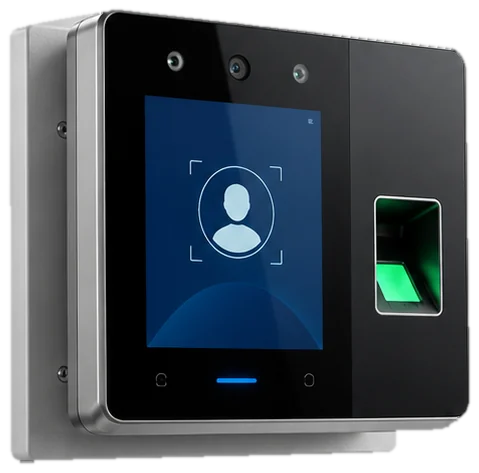
What a time and attendance system is and what it solves
A time and attendance and workforce management system (WFM) records punches from biometric clocks or apps, plans shifts and passes worked hours, lateness and overtime to payroll.
It solves a concrete problem: HR exports punches to Excel and checks attendance differences and overtime by hand before every payroll.
Processes it covers

Signs your company needs a time and attendance system
If three or more happen before each payroll, the assessment shows whether to start with working-time rules, the clock's staff list or integration.
- Biometric punches are exported to Excel
- Overtime is paid without approval
- Lateness and absences are loaded into payroll by hand
- Rotating shifts are planned on a whiteboard
- Field staff have no way to clock in
- Hires and exits reach the biometric clock's staff list late
Who a time and attendance system is for and when it does not fit
Who it is for
- Companies with rotating, night or compressed rosters
- Operations with field staff who never pass through a site
- Teams that export punches to Excel before every close
- Companies with frequent overtime that needs prior approval
When it does not fit
- Fixed hours at one site and little overtime: the biometric clock with its own report may be enough.
- If the current clock cannot export punches, the first change is the device, not the software.
- If payroll is not in order either, fix both together. Hours without calculation rules do not reach the payslip correctly.

The cost of checking punches by hand
Every close starts with a spreadsheet of punches, untraced corrections and overtime nobody approved. The error reaches the payslip and the complaint follows.
- Overtime paid without prior approval
- Deductions for absences that were justified
- Punches lost when a device disconnects
- An incomplete attendance register when SUNAFIL inspects
Example values you can edit. Count the hours spent checking punches and reconciling overtime before the close. The result does not estimate savings.
Assessment method for a time and attendance system
Seven dimensions of the DMG-RT method, derived from TOGAF. For time and attendance, the questions follow a punch from the device to the hour paid on the payslip. Each is scored 0 to 4 on facts you can check.
Process
Working-time rules written per shift type and planning ahead.
Data
An up-to-date clock staff list and punch corrections with a reason.
System coverage
Whether permissions and leave are matched with punches in the same system.
Integration
How hours reach payroll and how a disconnected device is detected.
Measurement and follow-up
Overtime against regular hours and absenteeism by department.
People and adoption
Whether supervisors approve in the system and how many can administer it.
Compliance and control
Attendance register (Supreme Decree 004-2006-TR), overtime and who corrects punches.

What a time and attendance project needs and what it delivers
What your company provides
- Make and model of the clocks, and whether they can export punches
- Current shift types, schedules and tolerances
- Overtime policy and who approves it
- Punches exported for one full month
- Staff list with assigned schedules
- The format in which your payroll receives hours, lateness and absences
What you receive
- Working-time rules written per shift type, with test cases
- Tool comparison matrix with three-year cost
- Overtime approval before the close
- Approved hours connected to your payroll or ERP
- Alert when a device stops sending punches
- Attendance register under Supreme Decree 004-2006-TR
Steps of a time and attendance project
Attendance assessment
Ten minutes. The radar shows whether control fails on working-time rules, the staff list, approvals or handover to payroll.
Review with a punch report
Twenty minutes. Diego goes through your answers with a real clock report and decides which shifts are written first.
Working-time rules workshop
Rules per shift type, tolerances, overtime and rest periods, with test cases taken from your last close.
Selection and payroll integration
Tools compared against your rules and your clock. The vendor installs devices and software; Diego connects approved hours to payroll or the ERP, with an alert if a device stops sending data.
Market options for a time and attendance system
Attendance tools differ in the devices they read and in how they model atypical rosters. The list is not a ranking.
Odoo
Odoo Attendances and Planning, with clock-in from a kiosk or phone, when the company uses Odoo for HR or payroll.
Odoo Attendances enters the comparison when payroll or employee records already run on Odoo. It is tested with the same clock and rosters as the other options.
Other platforms
- ZKTeco (biometric devices and software)
- UKG (Kronos)
- Deputy
- Buk Asistencia
- Factorial
Trademarks belong to their owners.
Comparison criteria
- Whether the biometric clock lets you extract punches automatically
- Rotating, night and compressed rosters without development
- Phone clock-in with location for field staff
- Overtime approval by the supervisor before the close
- Hours exported in your payroll's format
- Total cost over three years: devices, licences and support
Limits of a time and attendance system and how they are handled
- The software reads what the device records. An outdated staff list on the clock produces absences that never happened.
- Atypical rosters are modelled as separate rules and tested before the first close.
- Installing and maintaining the devices is the vendor's job.
- Phone clock-in needs a location validation rule agreed with you.
Services for a time and attendance system
Assessment and review
- Online assessment of time and attendance
- 30-minute review with a punch report
- Free of charge
You answer it
Working-time rules workshop
- Rules per shift type
- Test cases from the last close
- Written overtime policy
The process owner approves it
Tool selection
- Options compared with your clock
- Demo with your rosters
- Total cost over three years
You decide with a written matrix
Payroll integration
- Approved hours to your payroll or ERP
- Testing in a separate environment
- Alert when a device fails
You approve it after testing
Diego writes down the working-time rules, helps you choose the tool and connects it to your payroll or ERP. Devices and their software are installed by the vendor.
Systems that connect to a time and attendance system
Payroll (Peru)
Hours, overtime, lateness and absences reach the calculation approved.
See the systemHuman capital management
The schedule in the record is the rule each punch is read against.
See the systemManufacturing execution system
Hours per production order come from the same punch.
See the systemField service management
Field technicians clock in from their phone at the job site.
See the systemAssessment in 10 minutes: time and attendance
The analysis measures how rotations are scheduled, how workers clock in at camp and work fronts, and how hours reach payroll. The questions describe observable situations, from paper time sheets to connected and approved clocking.
Scored dimensions
- Workday and rotation rules. Looks at whether cumulative workday, crew change and rest rules are written down and whether the rotation schedule is published before workers travel to site.
- Roster and field clocking. Looks at whether every worker is identified in the clocking devices at camp and at the work front, and whether lost or corrected punches are explained.
- Time sheet to payroll. Looks at how hours, absences, leave and rotation days reach payroll, and how much is keyed in again along the way.
- Overtime and absence by rotation. Looks at whether overtime is approved before payment, whether it is compared with regular hours by rotation and area, and whether absence leads to an action with an owner.
- Legal record and access control. Looks at whether the legal attendance record is complete and searchable, who can correct a punch and how many people can administer the devices.
What you receive
When you finish you receive your level in each attendance and rotation dimension, with gaps ranked by weight. Each gap includes a first action your team can verify at the next close.
18 scored questions and 15 context questions (type of operation, size, current system). Context questions are not scored: they let us read the result against similar operations.
Frequently asked questions: time and attendance
Devices and their software are installed by the vendor. Diego first checks whether the device lets you extract punches automatically, because the integration depends on it.
Rotating, night and compressed rosters such as 14x7 are modelled as separate rules and tested with real cases before the first close.
For people who never pass through a site, clock-in can be done from a phone with location. The validation rule is defined with you.
It is the core of the service: approved hours flow to your payroll or ERP without re-keying, and an alert warns if a device stops sending data.
The design includes the attendance register required by Supreme Decree 004-2006-TR, open to workers and backed up.
Measure your time and attendance in 10 minutes
Ten minutes to see where clocked hours get lost or overpaid. Diego Muñoz reviews the result with you, in Lima business hours.
WhatsApp +51 919 488 260 · damunoz@dmunozgroup.com